

To set up IPTV on Windows PC, start with a compatible player and the correct access details from your television service. This guide walks through opening an M3U address or playlist file in VLC, checking playback, and isolating common errors. Matching the login format first helps you avoid wasted installation time and repeated failed sign-ins.
You can follow these instructions for a home computer or an approved workplace installation. A business environment also requires permission to install software and show the selected programming. Keep account access separate from decisions about channel licensing or public viewing.
Key Takeaway
Set up IPTV on Windows with VLC and an authorized M3U playlist. Match the login format to your player, load the supplied address or file, and test playback. Protect credentials, compare wired and wireless connections, troubleshoot errors systematically, and confirm business viewing permissions before showing television to staff or customers.
What You Need Before You Start
Prepare your Windows computer, an internet connection, and an M3U address or file from your service. Keep the activation message nearby, but do not paste private credentials into public testing websites. Confirm whether the account permits another simultaneous stream before using a computer alongside your television.
VideoLAN’s official Windows download page lists VLC as free software and provides installer options for different computer architectures. On an organization-managed PC, ask IT which installer and deployment method are approved. Do not use an unrelated download site merely because its advertisement appears first.
Decide what success looks like before testing. For Example, you might require one approved news channel to open, sound to play through the intended output, and a second authorized feed to load. Record the outcome instead of treating a briefly visible picture as proof that the whole subscription works.
How to Open an IPTV M3U URL in VLC
This method applies when your service supplies a complete playlist or stream address. It does not require you to assemble a URL from separate account fields. Keep the exact original address, including its protocol, port, path, and query parameters.
Step 1) Open the approved VLC installation on your computer. New users should obtain the installer through VideoLAN’s official download page and follow the installation prompts permitted by their organization.
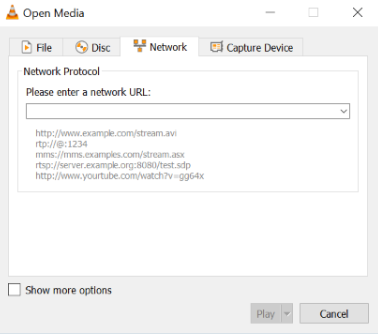
Step 2) Select Media, then Open Network Stream. VLC opens the Network tab of its Open Media dialog.
Step 3) Paste the complete supplied M3U or stream address into the network URL field. Remove accidental spaces at either end without changing characters inside the address.
Step 4) Select Play. Check the picture and sound, then note any error message. Keep the unmodified source details available for comparison.
The menu path and network field are documented in VideoLAN’s media guide. Its reference screenshot below shows the Network dialog. The example address shown there is not your subscription address.
Compare the displayed error with the address you entered before reinstalling anything. A working player cannot repair an expired subscription or a stream that the service no longer provides. Ask support for a replacement address when the original resource has changed.
How to Open a Downloaded M3U Playlist File
A downloaded playlist is an alternative input, not an offline television library. Its entries may still point to internet streams that require active account access. Save the original file in a private folder so you can repeat the same test without editing it.
Step 1) Open VLC and select Media, then Open File.
Step 2) Browse to the playlist supplied by your service. Select the intended M3U file rather than a similarly named installer or archive.
Step 3) Select Open. Check whether the player loads the supplied entries or reports an error. Document the result before trying a revised file.
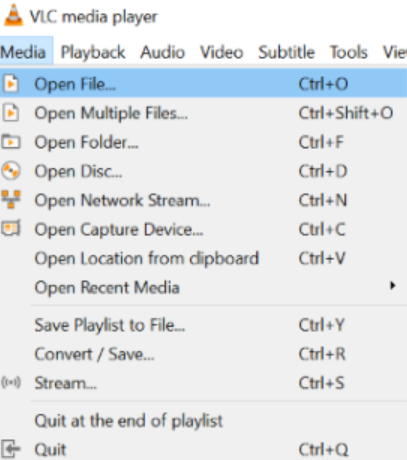
VideoLAN also documents dragging a file into the main interface or playlist window. Use whichever approach makes it easier to select the correct source. Repeated failures with the same downloaded playlist warrant a check of the original file and account, not a series of unrelated software installations.
Match the Login Format and Understand Setup Costs
The access details determine your next step. A complete M3U address belongs in the network URL field covered above. Separate server, username, and password values require a player that explicitly offers those inputs, or an M3U address obtained from the service.
A portal address is another distinct input. Do not assume it can replace a playlist URL. Describe the format you received when contacting support, but omit sensitive values from public messages.
| Input or Cost | What to Do |
|---|---|
| M3U address | Use the network-stream method. |
| Downloaded M3U file | Use the file-opening method. |
| Separate account fields | Use a compatible login screen or request an M3U address. |
| VLC player | $0. VideoLAN advertises it as free, open-source software. |
| Television access | Separate from the player. Use the terms and amount on your service agreement. |
This is a setup guide, not a subscription price comparison. No universal channel plan is included with the player. Review any account purchase separately from the software installation, including the permitted devices and intended viewing environment.
How to Troubleshoot Playback and Buffering
Change one variable at a time. Begin with the untouched source details, then compare another authorized channel. A clear record of what works helps separate a source problem from a broader connection issue.
| Symptom | Next Test | Useful Evidence |
|---|---|---|
| Address will not open | Compare the entire URL with the original message. | Exact error, with credentials redacted. |
| Only one channel fails | Open another supplied feed. | Channel name and time of failure. |
| Several feeds stall | Compare Ethernet with normal Wi-Fi and pause competing downloads. | Which connection improves playback. |
| Video works without sound | Check Windows output selection and player volume. | Whether another application produces sound. |
| General internet access fails | Use Windows’ Network and Internet troubleshooter. | Diagnostic result and affected applications. |
Microsoft recommends the Network and Internet troubleshooter in the Get Help app for Windows 11 connectivity problems. Its official Wi-Fi troubleshooting guide provides the next checks. Network reset is a last resort because it removes adapters and their settings and may require networking software to be configured again.
Do not disable security protections to make a stream load. On a managed computer, share a redacted error with IT and request an approved resolution. A deadline for a meeting or event is not a reason to install an unknown player.
FAQs
🖥️ Can I set up IPTV on Windows without buying a player?
Yes. VideoLAN provides VLC as a free, open-source player for Windows. You still need a compatible stream or playlist from your service. A free player does not provide subscription channels, replace account credentials, or establish viewing rights.
🔗 Should I enter an M3U URL or an Xtream Codes login?
Choose the format your service supplies and your player accepts. This guide uses VLC’s network URL field. Keep separate server, username, and password credentials for an application with that login screen. Request an M3U address instead of guessing.
📁 What is the difference between a playlist URL and a downloaded file?
A URL points to a remote resource, while a downloaded playlist is stored on your computer. Both can reference online streams. Saving a playlist does not download its channels, preserve account access, or guarantee that its links remain available.
🛠️ Why does VLC say it cannot open the stream?
Start by comparing the complete address with the original message. Remove accidental spaces, preserve the protocol, and check account access with your service. Try another supplied channel. Record the error without sharing private credentials in a screenshot or forum.
📶 How can I reduce buffering on my Windows PC?
Compare the same stream over Ethernet and your Wi-Fi connection. Pause competing downloads, then repeat the test. Check several channels before changing player settings. Record which feeds stall and when so support receives useful evidence rather than a general complaint.
🔒 Is it safe to share an M3U link for troubleshooting?
Treat a private M3U address like a password. It can contain account identifiers or access tokens. Send it only through an authorized support channel when necessary. Redact sensitive portions before sharing logs, screenshots, or examples with colleagues or public communities.
🏢 Can I use this setup to show television in a business?
Technical playback does not establish permission for business use. Ask the service to confirm whether its agreement covers your location and intended audience. Keep that authorization with the account records. A personal subscription should not be assumed to cover customers.
Conclusion
- Start with the correct input: A supplied M3U URL and a downloaded playlist need different opening methods.
- Keep setup straightforward: VLC provides the documented network-stream and file-opening workflows covered here.
- Verify the result: Check authorized feeds, audio, and the intended connection before relying on the setup.
- Protect your account: Keep access details private and confirm permission for any workplace viewing.
A useful Windows IPTV setup is repeatable and easy to diagnose. Preserve the original source details, record problems precisely, and involve your service or IT team when access or installation requires their help.